
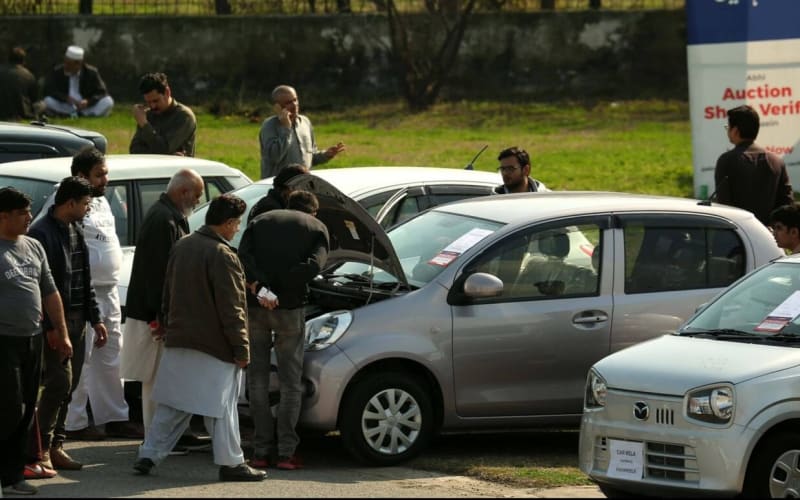
Quick answer: Before you pay for a used car in Pakistan, check its record on the Excise portal of the province where the car is registered — Punjab's MTMIS at mtmis.excise.punjab.gov.pk, Sindh Excise at excise.gos.pk, or the Islamabad Excise portal — match the engine and chassis numbers on the car with the record and papers, confirm token tax is paid, and, in Karachi, get CPLC clearance on 1102. Never pay in full until the seller is available for biometric verification: without it, the transfer cannot be completed.
How to check the registration record
Use the portal of the province where the car is registered, not where you live — a Karachi car will not appear on Punjab's MTMIS. Online checks are free; SMS checks may carry a normal charge.
Punjab (MTMIS)
- Open mtmis.excise.punjab.gov.pk, ideally from a link on the Punjab Excise website, excise.punjab.gov.pk, not a link forwarded on WhatsApp.
- Enter the registration number exactly as on the number plate, plus the registration date from the car's papers, complete the picture code (captcha) and search.
- Compare the result with the papers: owner, make, model, year, engine and chassis numbers, colour and token tax must all match.
No internet? Send the registration number by SMS to 8785 for a basic Punjab record.
Sindh
Open excise.gos.pk, choose vehicle verification, select four-wheeler or two-wheeler, enter the registration number and search. Check owner, engine and chassis numbers, tax history and CPLC status. For older cars the record can be thin, so "record not found" means an Excise office visit, not trusting the seller.
Islamabad and Khyber Pakhtunkhwa
For Islamabad cars, use the ICT Excise portal (islamabadexcise.gov.pk, per an October 2026 portal check). For Khyber Pakhtunkhwa, the department site is kpexcise.gov.pk, but its verification link was missing in that check — if so, verify by phone or at the district Excise office. Never enter a car's details on a non-government site; fake verification sites are common.
Is the car stolen? The CPLC check
For a Karachi or Sindh car, call the Citizens-Police Liaison Committee (CPLC) 24/7 call centre on 1102, 021-35662222 or 021-35682222, giving the registration, engine and chassis numbers for a check against CPLC's stolen and snatched vehicles database.
Match the numbers on the car itself
- Chassis number: find it on the firewall under the bonnet or under the driver's seat, and compare it character by character with the record and papers. Fresh paint or grinding marks around it is a walk-away sign.
- Engine number: match it the same way. Any mismatch means an Excise office visit before any deal, not a discount negotiation.
- Plates and papers: check the plates are officially issued, and ask for the original registration book or smart card, not a photocopy. The seller's CNIC must match the registered owner.
- Accident signs: uneven panel gaps, mismatched paint and overspray suggest major repair. If unsure, pay a trusted mechanic for a pre-purchase inspection.
- Test drive: drive it cold; check brakes, steering, air conditioning, exhaust smoke and warning lights.
Token tax and the transfer: the two deal-breakers
Confirm token tax is paid on the Excise record, and get proof from the seller. Unpaid tax blocks a transfer and can land on the buyer if the agreement does not settle it. Amounts vary by engine capacity and province, so confirm the figure on the portal or at the office.
Biometric verification is mandatory for buyer and seller in Punjab, Sindh and Islamabad. Never buy from someone who is not the registered owner, or who "will do the biometric later" — without it, the car stays in someone else's name. In Punjab, the buyer starts the transfer on ePay Punjab, pays the 17-digit PSID it generates (fee plus outstanding token tax) via a bank app, ATM, e-Sahulat, JazzCash or Easypaisa, and then seller and buyer verify by face and fingerprint on the NADRA Pak-ID app or at a centre. Fees vary by engine capacity and province, and processing is commonly reported as 7–15 working days — confirm both before paying. A written sale agreement on stamp paper, signed and witnessed, is good practice.
Red flags: walk away if you see these
| Red flag | Why it matters |
|---|---|
| Seller is not the registered owner | Only the registered owner can complete biometric transfer |
| Engine or chassis number does not match | Possible tampering, engine swap or stolen vehicle |
| No original registration book or smart card | Transfer cannot proceed without original documents |
| Token tax unpaid for years | Dues block the transfer and may fall on you |
| Price far below market value | Classic sign of a stolen, damaged or disputed car |
| Seller rushes you or refuses an Excise visit | A genuine seller has nothing to lose from verification |
Safe payment checklist
- Meet in public, ideally at a bank or near the Excise office, never pay in full in advance, and pay through a bank channel so there is a record.
- Write down the price, who pays the token tax, and the transfer date; keep copies of the seller's CNIC, papers and payment proof until the car is in your name, and do not take possession until verification is complete.
Related guides
For a Karachi car, browse Karachi on PkBizGuide; for Lahore, see Lahore on PkBizGuide.
Frequently asked questions
What is MTMIS?
Punjab's vehicle registration database, run by the Punjab Excise Department. It shows a Punjab car's owner, engine and chassis numbers and token tax status.
How do I verify a car registered in Sindh?
Use excise.gos.pk and enter the registration number. For theft status, also call CPLC on 1102 with the registration, engine and chassis numbers.
Can I check a car using only its number plate?
Yes for the basic record — the registration number is the main search key. In Punjab's current portal you also need the registration date from the papers, plus the captcha.
Is biometric verification really mandatory for car transfer?
Yes, in Punjab, Sindh and Islamabad both buyer and seller must complete it. Without the seller's biometric, the transfer is not valid.
What if the online record does not match the car?
Do not buy it. Visit the Excise office with the papers and the car's numbers, and let them explain the mismatch first.
How long does an ownership transfer take?
Commonly reported as 7–15 working days, depending on province and office. Confirm the timeline when you apply.
Portals, helplines and transfer steps checked on 4 November 2026. Fees, tax amounts and portal layouts vary by province and can change; confirm the exact fee and status on the official portal or at the Excise office before paying.
Explore more businesses in Consultancy Services
Browse more verified listings in this category to compare services and contact top providers.
Explore CategoryRelated Blogs
Continue reading related guides to deepen topic relevance.
How to Check If You Are a Tax Filer in Pakistan (FBR ATL Check by CNIC)
Not sure if you are a filer? Check your FBR Active Taxpayer List (ATL) status in one minute — by SMS to 9966 or online on the FBR IRIS portal, free and with no login.
How to Check Your Electricity Bill Online in Pakistan (LESCO, IESCO, MEPCO, K-Electric)
Check your bijli bill online free: use the 14-digit reference number on bill.pitc.com.pk for LESCO, IESCO, MEPCO and other DISCOs, or your 13-digit account number for K-Electric. Steps, payment options and fixes for common problems.
How to Check Your Sui Gas Bill Online in Pakistan (SNGPL and SSGC)
Check your Sui gas bill online free: SNGPL customers use their 11-digit consumer number on sngpl.com.pk, SSGC customers use their 10-digit customer number on viewbill.ssgc.com.pk. Steps, payment options and fixes for common problems.