
Quick answer: Check coverage at your exact address first — fibre is street-by-street, and a provider that serves your neighbour may not serve you. Then compare the monthly fee, installation charge and router cost together: the cheapest monthly package is not always the cheapest first bill. Installation usually takes 3–7 working days once your address qualifies.
First, check which providers reach your street
A company can only connect you if it has already laid fibre to your street, so the real answer is address-by-address — coverage maps look broad, but they hide street-level gaps.
- PTCL Flash Fiber has the widest footprint, covering 100+ cities. Call 1218 with your exact address, or use the coverage checker on PTCL's website.
- StormFiber is strongest in Karachi, Lahore, Islamabad and Rawalpindi, and lists around 26 cities. Check stormfibre.com or call 021-111-786-786.
- Nayatel serves Islamabad, Rawalpindi, Peshawar and Faisalabad, with limited coverage in parts of Lahore. Check nayatel.com or call 051-111-11-44-44.
If none reaches your street, join the provider's waitlist and use PTCL DSL or a 4G home device in the meantime. Never pay an installer in advance before your address is confirmed as covered.
How much speed does your home need?
As a rough guide: 10–15 Mbps suits 1–2 light users; 20–30 Mbps suits a small family with video calls and online classes; 50 Mbps suits a busy family with 4K streaming and gaming; 100 Mbps and above suits heavy users and smart homes. Fibre usually gives equal download and upload speeds, which helps video calls.
PTCL, StormFiber and Nayatel compared
Prices below are indicative, gathered on 13 November 2026. Providers revise prices and run promotions, and taxes are added on top — confirm the exact figure before you pay.
| Provider | Popular packages (per month) | One-time installation | Helpline |
|---|---|---|---|
| PTCL Flash Fiber | 10 Mbps ~Rs 2,799; 30 Mbps ~Rs 4,799; 100 Mbps ~Rs 9,499 | ~Rs 5,000 (promos sometimes waive it) | 1218 |
| StormFiber | Triple Play: 10 Mbps Rs 1,999; 20 Mbps Rs 2,999; 30 Mbps Rs 3,999; 50 Mbps Rs 5,999; 1 Gbps Rs 9,999 (before tax) | Rs 6,999–11,499 by package | 021-111-786-786 |
| Nayatel | 15 Mbps ~Rs 2,499; 50 Mbps ~Rs 3,499; 100 Mbps ~Rs 4,999 | Setup ~Rs 4,999; ONT with WiFi can cost extra (~Rs 11,000, sometimes on instalments) | 051-111-11-44-44 |
StormFiber's Triple Play bundles include TV and a phone line; its internet-only plans carry a different one-time charge (around Rs 12,000 before tax). Ask each provider for the total first bill before you decide.
How to apply and what installation looks like
- Check coverage on the provider's website or helpline with your complete address.
- Apply online, on the helpline, or at a service centre. Keep your CNIC ready — the connection is usually registered in the CNIC holder's name.
- Pay the first charges through official channels only — the provider's app, website, bank transfer to its business account, or at its office. Never pay an installer in cash without an official receipt.
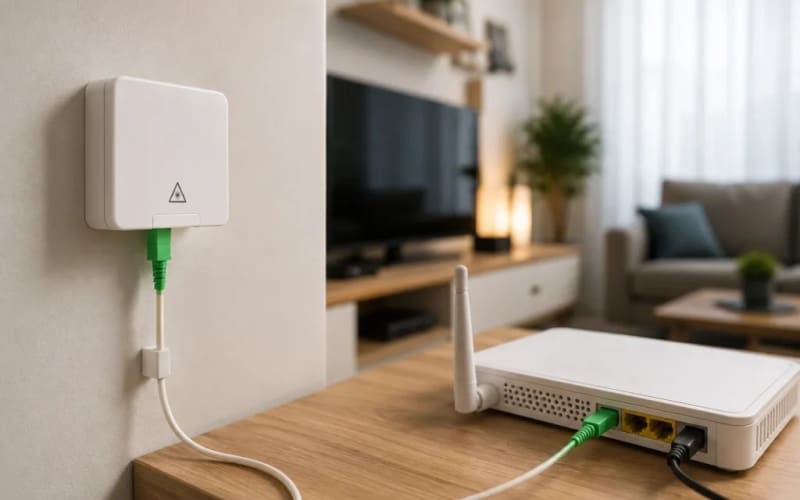
- The installation visit usually follows within 3–7 working days in covered areas. The technician runs a thin fibre cable into your home, fits a small wall box and an ONT (the fibre modem), then connects and configures the WiFi router. The visit takes 1–3 hours — run a speed test in the same room as the router before the technician leaves.
Do not bend the thin fibre cable sharply — it breaks easily, and a broken cable is the most common reason for a red LOS light. If the light turns red, call your provider's helpline.
What you will pay on day one
- Monthly fee and installation charge — check whether the quoted price includes tax. Sales tax and advance income tax are added on top of many advertised prices, so the bill is often 20–35% higher than the headline figure.
- ONT and router — included, rented, or sold? A better dual-band router for a large house can cost extra.
- Shifting and cancellation — moving house later usually costs extra, and early cancellation can mean paying the remaining months.
Common problems after installation
- Slow WiFi in far rooms: move the router to a central, open spot — not inside a TV cabinet — and consider a second access point for a large house.
- Speed lower than promised: test with a cable (Ethernet) first. If wired speed is fine but WiFi is slow, the problem is your router or WiFi, not the line.
If your provider does not fix the problem
Complain to your provider first and keep the complaint or reference number, with the date. If the problem stays unresolved, escalate to the Pakistan Telecommunication Authority (PTA) at complaint.pta.gov.pk, through the PTA CMS app, or on the toll-free helpline 0800-55055.
Before you sign up: a 2-minute checklist
- Coverage confirmed for your exact address, not just your area.
- Total first bill in writing: monthly fee, installation, device and tax.
- Contract length and what early cancellation costs.
- Router included or extra — and who replaces it if it fails.
Related guides
Setting up a home office or a small business? See our guides on starting a small business in Pakistan and checking how many SIMs are registered on your CNIC. To find providers near you, browse IT services on PkBizGuide.
Frequently asked questions
Which is the best home internet in Pakistan?
It depends on your street. PTCL covers the most cities; StormFiber and Nayatel often win on speed and service where they operate. Check coverage first.
How long does WiFi installation take?
Usually 3–7 working days after approval in a covered area; the visit itself takes 1–3 hours. Streets without laid fibre can take weeks.
What documents do I need?
Your CNIC copy is the main requirement; the connection is registered in the CNIC holder's name. Some providers also ask for proof of address.
How much does installation cost?
Typically around Rs 5,000 (PTCL) to Rs 6,999–11,499 (StormFiber, by package), plus the monthly fee, tax and sometimes a router charge.
Is fibre better than DSL or 4G?
Yes, for most homes: fibre gives steadier speeds and equal upload and download, which matters for video calls. DSL is the fallback where fibre has not reached, and 4G devices suit light or temporary use.
What if my internet is slow or keeps disconnecting?
Test with a cable first, restart the ONT and router, and check for a red LOS light. If it continues, complain to your provider, then escalate to PTA on 0800-55055.
Facts checked on 13 November 2026. Package prices, installation charges and coverage change often and vary by city and tax — confirm the exact figures before paying.
Explore more businesses in Information Technology (IT) & Services
Browse more verified listings in this category to compare services and contact top providers.
Explore CategoryRelated Blogs
Continue reading related guides to deepen topic relevance.
Top IT & Services Businesses in Multan (2026 Guide)
Discover Multan's growing IT scene from a women-only ride app to digital marketing agencies and tax tools. See who's leading tech and services in the city.
Top Education Institutes & Schools in Multan (2026 Guide)
From Bahauddin Zakariya University to top schools and IT institutes, explore Multan's leading education providers shaping students' academic and career paths.
3 Standout Local Shops & Traders in Lahore (2026 Guide)
From luxury bridal couture to industrial machinery and digital blogs, meet 3 standout local shops and traders making their mark in Lahore.